From first login to full control. In 8 steps.
No implementation. No consultants. No six-figure contract. Upload your first invoice and start reviewing in under 5 minutes.
Your workflow, end to end
Eight steps from sign-up to full spend intelligence. Each one takes minutes, not months.
Sign Up & Create Your Organization
Sign up free. The first user becomes admin automatically. Invite your team with role-based access — Legal, Legal Ops, Finance, or Paralegal. No credit card required at signup.
Create Organization
Guidelines Builder
Import OCG Document
PDF, DOCX, TXT — AI extracts rules
Set Up Your Guidelines
Generate from 37 default rules across 8 sections OR import your existing OCG document (PDF, DOCX, TXT). AI extracts and categorizes rules automatically.
Add Firms & Matters
Track which firms handle which matters. Assign budgets, contacts, and timekeepers. Upload fee estimates with phase breakdowns.
Firms & Matters
Litigation · Blake & Associates · 4 timekeepers
Invoice Upload
Drop PDF or LEDES files here
or forward to org@counselaudit.com
Line items, timekeepers, dates, amounts, task codes extracted
Upload Invoices
Drag-and-drop PDF or LEDES invoices. Or forward them to your org@counselaudit.com intake email. AI parses every line item, timekeeper, date, amount, and task code.
Automatic Review Against Three Sources
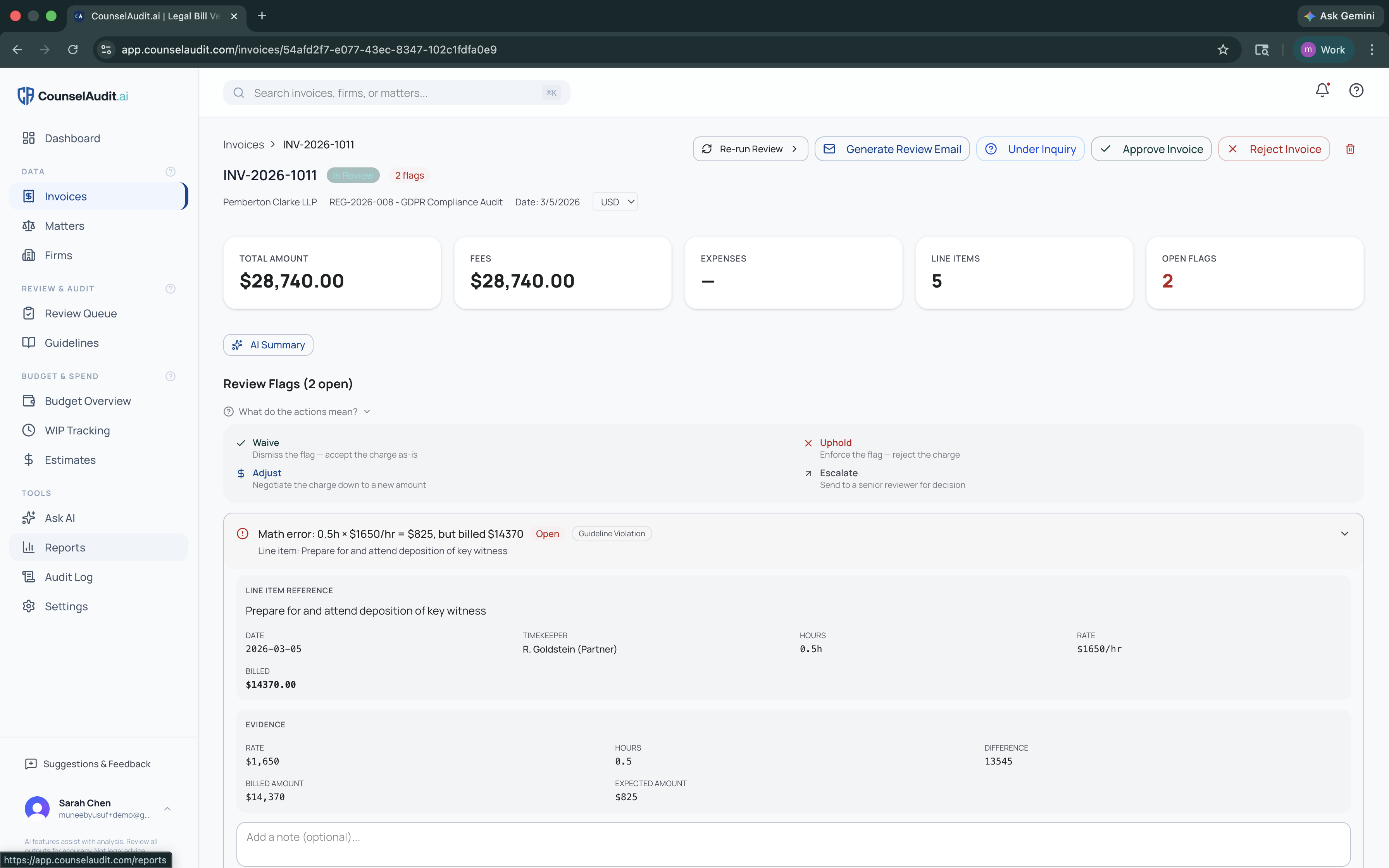
Every invoice is reviewed against one or more of: your 43 built-in heuristic checks across 8 categories (Staffing, Fees, Expenses, Travel, Billing, Prior Approval, AI & Technology, Confidentiality), your Outside Counsel Guidelines (generated or imported), and any fee estimates provided for the matter. Each flag shows the source rule, the violation, and severity level.
This consistent, automated enforcement creates a sentinel effect: when firms know every line item is being parsed against your rules, billing practices self-correct before invoices are even submitted. The system flags the violation, not you, preserving the client-counsel relationship while holding the standard.
Flag Resolution
Generate Review Email
Dear Blake & Associates, following our review of invoice #4821, we have identified the following items requiring attention...
Resolve Flags & Approve
Four actions for each flagged line item: Waive (accept), Uphold (reject), Adjust (negotiate), Escalate (route to admin with email notification). Generate review emails to send to outside counsel.
Track Budgets & Spend
Budget overview with matter-level tracking: approved, invoiced, WIP, and projected spend. Automated WIP requests to firms. Ask AI natural language queries about your spend.
Budget Tracker
$142K
Approved
$38K
WIP
$70K
Remaining
Reports & Analytics
$1.2M
Total Spend YTD
$168K
Savings Found
Firm Scorecard
Report & Improve
Compliance dashboard, firm scorecards, spend forecasts, flag resolution breakdowns. CSV and PDF export. Full audit log of every action.
Ask anything about your legal spend.
Type a question in plain English. Get instant answers from your data.
“What’s our total spend with Blake & Associates this year?”
“Which matters are over budget?”
“Show me the average hourly rate by practice area”
“Compare Q1 vs Q2 litigation spend”
Prefer to work from your own AI assistant? Use CounselAudit from Claude / ChatGPT with the optional MCP connector: audit invoices, resolve flags, and draft firm response letters without leaving the conversation.
Ready to see it for yourself?
14-day free trial. No credit card at signup. No implementation fees. No sales call required.