Upload an invoice. Start reviewing in minutes.
An AI-native platform, not a legacy tool with AI bolted on. AI parses your invoices, drafts your guideline clauses, extracts rules from uploaded documents, and generates firm-specific guidelines letters. 43 pre-built review checks and real-time spend intelligence, built from the ground up.
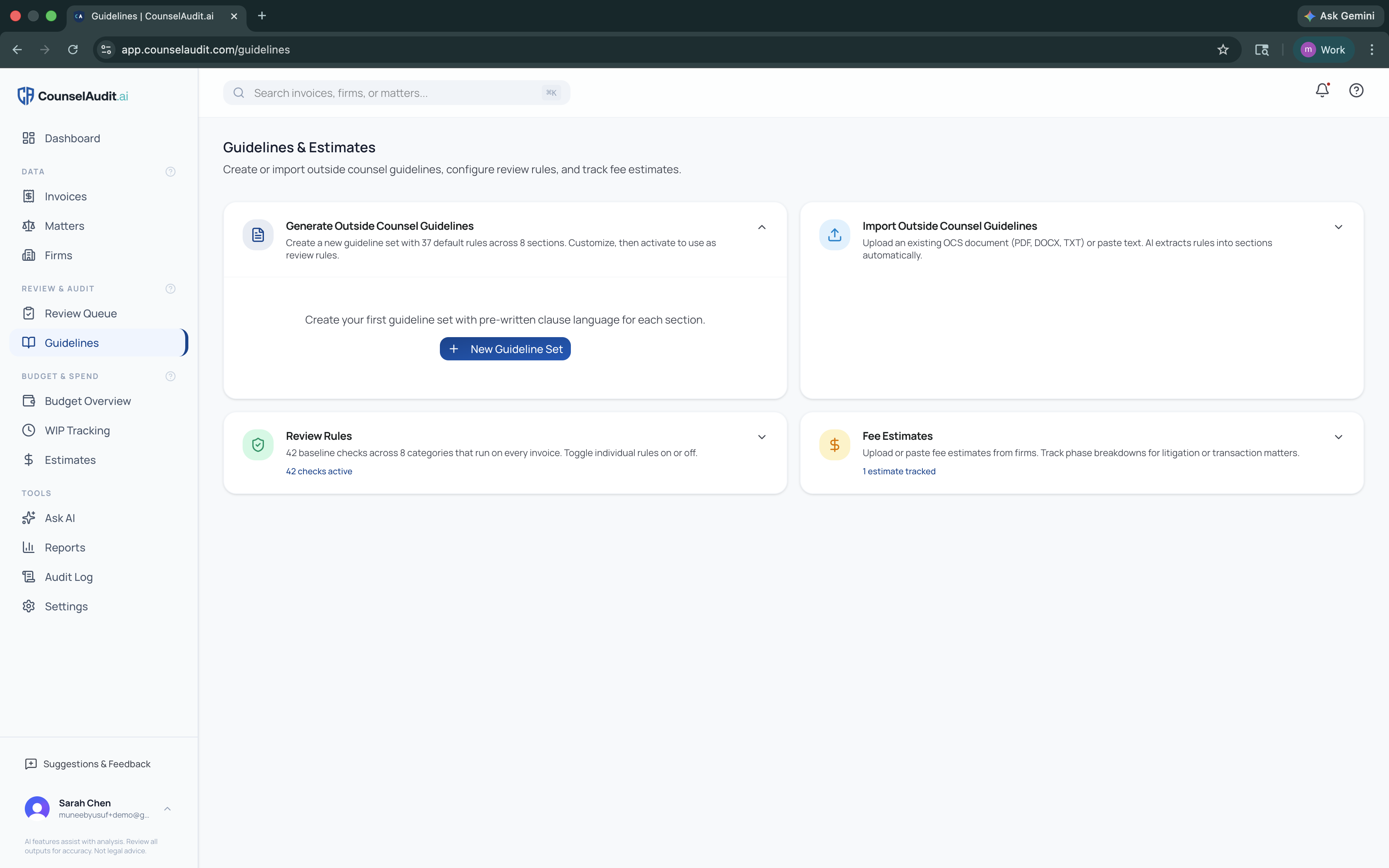
Your Guidelines & Estimates Hub
Four tools that work together. Build your guidelines, configure your checks, track your estimates, and review every invoice against them automatically.
Generate Outside Counsel Guidelines
Start with 37 default rules across 8 sections. Toggle rules on or off, edit clause language, adjust severity. Use AI to draft improved clauses. Activate when ready.
Sections
Import Existing Guidelines
Already have an OCG document? Upload your PDF, DOCX, or TXT file. AI extracts and categorizes your rules into sections automatically. Review, edit, and activate.
Supported Formats
43 Pre-Built Review Checks
Industry-standard heuristic checks that run automatically on every invoice. Toggle each on or off to match your policies. Add custom checks if needed.
Categories
Staffing & Supervision (9) · Legal Fees (9) · Expenses (7) · Travel (4) · Billing Requirements (4) · Prior Approval (3) · AI & Technology (5) · Confidentiality (2)
Fee Estimates & Tracking
Upload fee estimates from outside counsel. Break down by litigation phase or transaction element. Track actual spend against estimates throughout the matter lifecycle.
Phase Types
7 litigation phase presets · 6 transaction element presets · Custom breakdowns
AI Invoice Review
Upload & Parse
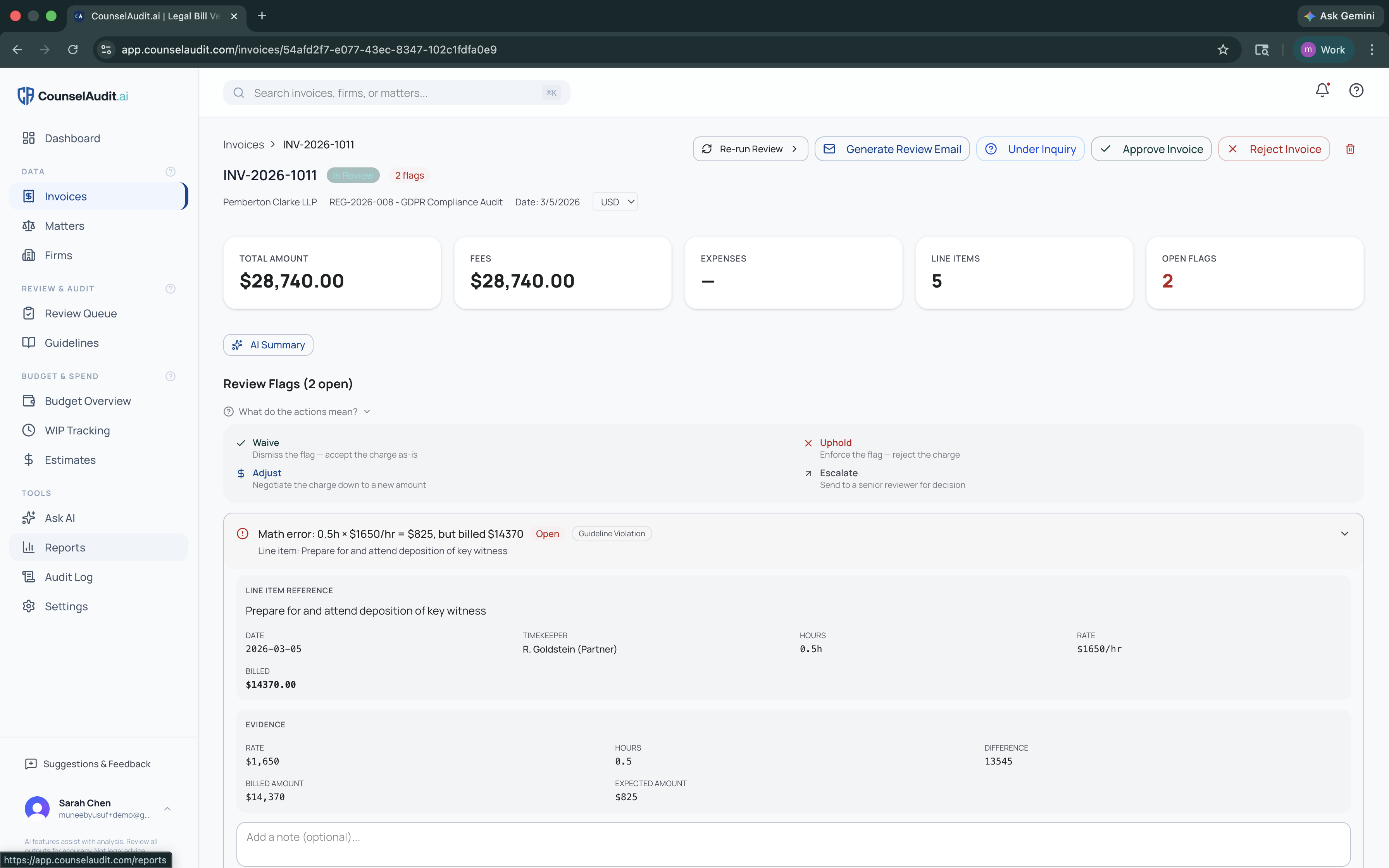
Drag and drop PDF or LEDES invoices. AI extracts every line item, timekeeper, date, amount, and task code. Firms and matters are auto-detected.
Automatic Flagging
Your 43 review checks run instantly. Each billing issue is flagged with the specific rule it violated and a severity level. No manual scanning required.
Four-Action Resolution
For each flagged line item, take a clear action: Waive the flag, Uphold it, Adjust the amount, or Escalate to a senior reviewer. Every action is logged in the audit trail.
Review Emails
After review, generate a professional email summarizing all flagged items, actions taken, and adjustment amounts. Copy and send to outside counsel.
Guidelines Letter
Dear Blake & Associates,
Please find enclosed the updated Outside Counsel Guidelines for all matters handled on behalf of [Organization]. These guidelines are effective immediately and supersede any prior...
[ 24 of 37 rules selected ]
Guidelines Letters
AI-Generated, Firm-Specific
Select a recipient firm and choose which of your 37 guidelines to include. Pick a tone, Formal, Collaborative, or Strict, and add any special instructions.
Professional & Ready to Send
AI generates a professional guidelines letter. Copy to clipboard or download as a text file. Send to outside counsel to set expectations from day one.
Budget & Spend Intelligence
Budget Overview
Track approved budgets, invoiced amounts, WIP, and projected spend per matter. Color-coded alerts when matters approach or exceed budget, red above 100%, amber at 80%, green below.
WIP Tracking & Automated Requests
Monitor unbilled work-in-progress amounts across all firms. Send automated WIP requests to outside counsel on a schedule you define. Get overdue alerts when firms haven't responded.
Fee Estimates vs. Actuals
Upload fee estimates from outside counsel. Break down by 7 litigation phases or 6 transaction elements. Track actual spend against estimates throughout the matter lifecycle. Spot scope creep before it becomes a problem.
Budget Overview
AI Usage billing guidelines, built in.
CounselAudit.ai is the first platform with dedicated AI & Technology billing checks. Five rules covering disclosure requirements, no AI learning curve billing, human review mandates, and more. Address the newest category of billing abuse before it becomes a problem.
Disclosure Required
Firms must disclose when AI tools are used in billable work
No AI Learning Curve
Zero tolerance for billing time spent learning AI tools
Human Review Required
All AI-generated work product must have human oversight
Ask AI
"What's our total spend with Blake & Associates this year?"
Your total spend with Blake & Associates in 2026 is $347,250 across 4 matters.
Based on 23 approved invoices. Largest matter: Harper v. Meridian ($186,000).
Ask AI
Natural Language Spend Queries
Type a question about your legal spend in plain English. Ask AI converts it to a database query, runs it against your data, and returns a plain-English answer with supporting details.
No Reports to Build
Skip the dashboard filters. Just ask: "Compare Q1 vs Q2 litigation spend" or "Which firms have the highest flag rates?" Instant answers, no configuration.
Use CounselAudit from Claude / ChatGPT (MCP connector)
The optional MCP connector brings the full review workflow into your AI assistant: audit invoices, resolve flags, draft firm response letters, and ask spend questions from the chat. Learn about the MCP connector.
Dashboard & Reporting
Executive Dashboard
Total Spend, Pending Review, Savings Found, and Guideline Compliance at a glance. Spend by Firm and Spend by Matter charts with All Time, YTD, and Last 3 Month views.
Invoice Queue Stats
Queue Total, High Severity flags, and Compliance percentage. See the health of your invoice pipeline instantly.
Reports & Export
Generate reports across firms, matters, and timekeepers. Export to CSV. Full audit log of every action for compliance and oversight.
Firm Scorecards
Track guideline compliance rates per firm. Recognize top performers and flag outliers for follow-up conversations.
Executive Dashboard
$1.2M
Total Spend YTD
$168K
Savings Found
12
Pending Review
87%
Compliance
Top Firms by Compliance
Invoice Email Intake
Every organization gets a dedicated intake email address. Forward invoices from outside counsel directly, they land in your queue, parsed and ready for review. No manual uploads required.
Up and running in minutes
14-day free trial. No credit card at signup. A 10-step guided tour walks you through everything on your first login.
Sign Up
Create your org. First user becomes admin automatically.
Set Up Guidelines
Generate from scratch or import your existing OCG document.
Upload Invoices
Drop a PDF or LEDES file. AI parses and flags issues instantly.
Review & Act
Waive, Uphold, Adjust, or Escalate every flagged item.
Track & Optimize
Monitor budgets, track WIP, ask AI about your spend, and export reports.
See it in action.
Upload your first invoice and start reviewing in under 5 minutes. No implementation, no onboarding calls, no sales process required.